-
Student Suggests
There are a number of existing ways you can access resources from the library, and our new Student Suggests initiative allows you the chance to recommend books for the library to buy that would benefit your course.
Perhaps you’ve stumbled across a hidden gem while you’ve been researching, or noticing everyone on your course wants that must-have book for longer!
This is your chance to enhance the library collection, by suggesting a title and posting it in at your library. Simply fill out the postcard and return it to your library. Our Student Advisors will then source the item and purchase it for the library.

Look for the postcards and return them to your library! Speak to a Student Advisor
Based at the Ask Desk on the 1st floor of the University Library, our Student Advisors are available 11am-4pm Monday-Friday, and can support you with…
- Searching the library catalogue and Discover More
- Using eResources for your subject
- Locating books
- Navigating Learning Edge
- Submitting your assignments
- General IT queries
- Printing, scanning and photocopying
- …and for any Student Suggests queries
Offering peer-to-peer support, Becca, Jemma, David, Jodie, Chelsie and Bella are here to support you.
Any questions or for more information please visit www.edgehill.ac.uk/ls/student-suggests or contact [email protected]
-
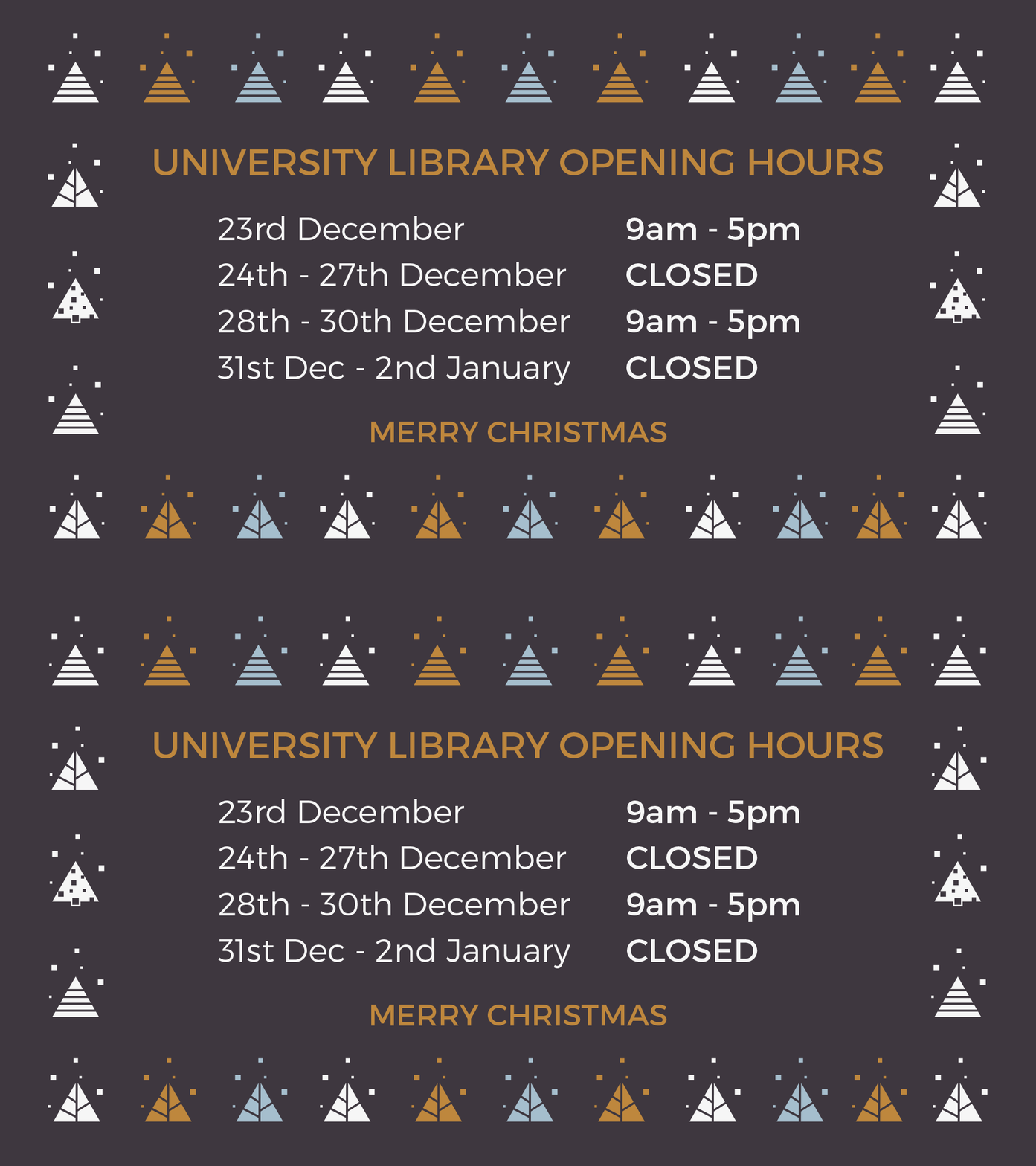
Happy Holidays at the University Library… 🎄
As much as we are all looking forward to the festive feasts (and post-feast naps) ahead I am sure many of you are not looking as forward to the approaching deadlines and revision…but fear not as the University Library will be open during the Christmas period so you can access all you need to succeed!
Full help desk services will be available during opening hours but please note it will be self-service facilities only on Friday 30th December.
So why not visit us between Christmas and New Year to take advantage of all we have to offer…
- Networked PCs, loanable laptops and free eduroam Wi-Fi
- Access to over 265,000 items including books, journals and audio-visual resources
- Printing and photocopying
- Bookable individual and group study rooms
- A range of study zones – group work, quiet work and silent study
- Access to help and support – staff will be available at the welcome desk
- 24/7 access to PCs in the LINC – available 365 days a year!
Of course if you aren’t quite ready to leave the house just yet you can always visit us virtually…
- eResources are available via our Learning Services web pages and Library Catalogue – you can access 172,400+ eBooks, 64,900+ eJournals and specialist subject resources 24/7.
- Contact Learning Services via our 24/7 Live Chat
- Search our knowledge base Ask Us for the answer to many common queries including using Turnitin, Harvard Referencing and much more.
- Get support with academic writing, assignment planning, critical thinking and much more via our Uni Skills offer.
- Give us a call 01695 650800 during opening hours.
Merry Christmas from us all at Learning Services 🎄

-
Online Assignment Submission: Final checks ✔
This week the Learning Technology Development team posted its annual ‘Keep Calm and Submit’ post on the Learning Edge blog, highlighting the latest tips and good practices to ensure your online submissions over the next week go as smoothly as you could possibly wish for.
As an additional treat for all students we’ve also put together 4 simple steps to help with some of the pre submission checks you might not have thought about before clicking the submit button.
Step 1 – Did you rememeber to add your frontsheet or SpLD coversheet?
If you are required to submit your assignment with a specific frontsheet/coversheet for academic or SpLD needs, please ensure you have added this before submitting. General frontsheets are usually supplied within your module/programme area on Blackboard. Please contact your tutor if you are unsure of its location online.
If you have a SpLD coversheet, this would have been compiled and provided by the SpLD Support Team prior to any online submission. If you are unsure or need further support with the SpLD cover sheet you have been provided with, please contact the SpLD Support Team:
- In Person: Ask desk, 1st floor, University Library
- Email: [email protected]
- Telephone: 01695 584372
Step 2 – Is your file the correct type?
Any assignment submission through Blackboard accepts a wide range of file types for both Turnitin and the standard Assignment tool. You can find details of the accepted file types for each submission tool in the links provided below:
If you submit any other file types (or files with the incorrect file extension) you will receive an error message and will need to re-save your assignment in one of the permitted formats and begin the submission process again.
Step 3 – Is your browser up to date?
Another top tip is to always ensure that your browser is up-to-date. We recommend Mozilla Firefox or Google Chrome upgraded to the latest version gives the best experience. If your laptop or PC uses Windows 10 as its operating system, be aware that the default browser may be set to ‘Microsoft Edge’ – perhaps OK for general surfing on the net – but when it comes to activities such as assignment submission please avoid using this browser. So, please if you havent already – download and install Firefox or Chrome and use one of these browsers when submitting your assignment(s) online.
Step 4 – Do you have a good internet connection?
Before uploading your work, you will need to have a good internet connection within a location that doesn’t have any security barriers such as ‘pop up blocker’ for your browser or a security firewall that’ll prevent you from uploading any data to the internet.
Pretty much all standard home Broadband connections are fine, but if you don’t have internet access at home please be mindful of submitting your work from a location such as a school or NHS Trust (placement setting) as you might run into problems due to security settings.
We know that when that deadline is approaching it’ll be stressful enough without unexpected niggles, so try not to leave your submission till the last minute. This echoes all points above but if done correctly will ensure the final moments before you click ‘Submit’ will be as stress-less as possible. Remember, if you have any problems Keep Calm and Ask Us!
Good luck with your assignments!

Mark Wilcock
Learning Technology Development Officer