-
Get on your digital pathway – Digital Creation
As part of the Digital Workplace Technologies offer, we have created 8 pathways for staff to explore. These pathways have been specifically designed to allow staff to enhance their knowledge in that area in more depth.
 The pathways include:
- Digital Productivity
- Digital Communication
- Digital Collaboration
- Digital Creation
- Digital Wellbeing
- Digital Proficiency
- Digital Participation
- Digital Learning and Teaching Technologies
Focus on … Digital Creation.
Digital images, infographics, videos, presentations and photographs are just some of the ways digital creativity can be expressed. Digital creation is the ability to create, use and evaluate digital technologies, designing digital materials to present and communicate information.
These sessions aim to provide staff with the opportunity to design and create digital materials, to communicate information, to learn about new pieces of creative software and to develop new digital talents.
Upcoming Digital Creation Sessions
Picktochart
Infographics are visually engaging ways to present information quickly and clearly, allowing people to learn about a topic without too much heavy reading. They often contain images and charts and do not use lengthy amounts of text. Piktochart is an online program which allows the free creation of infographics. This session will look at using Piktochart to create infographics which contain text, charts, images and videos and look at how these can be shared via print and online methods.
Thursday 28th March 2019 – 10am-11am
Friday 24th May 2019 – 11am-12pm
Book your session on MyView here.
PowToon
This session will introduce staff to the animated presentation software PowToon and explore the different features available for adding text, images, audio files and applying animations.
Tuesday 16th April 2019 – 2pm-3pm
Monday 3rd June 2019 – 11am-12pm
Book your session on MyView here.
Sway
This session will cover the basics of using Sway, a presentation software available as part of Office 365. Staff will learn how to navigate the application, how to add, edit and embed material, and how to publish their finished presentations.
Monday 25th March 2019 – 1pm-2pm
Wednesday 3rd April 2019 – 3pm-4pm
Book your session on MyView here.
Prezi
This session will look at using Prezi as an alternative way to create engaging and interactive presentations. This session will allow staff to create, design and share online presentations.
Friday 5th April 2019 – 11am-12pm
Book your session on MyView here.
Stay up-to-date with our latest developments on our blog and WIKI.

Written by: Laura Riella
Digital Capabilities Coordinator
-
Digital Workplace Technologies
The new Digital Workplace Technologies offer has officially launched! This is an exciting new programme that aims to provide all staff with a clear pathway to increase and enhance their digital knowledge and capabilities.
Learning Services aims to provide staff at Edge Hill University with a high-quality learning and development experience, enhancing staff digital capabilities through a variety of staff development sessions, online guides and resources. It is central to our vision that staff are challenged, engaged and supported throughout their digital learning journey.
The new structure will allow staff to follow digital pathways based on their training needs. Within each pathway staff will have the opportunity to be actively engaged in face-to-face sessions, access online guides/resources and suggested courses on LinkedIn Learning.
These pathways include:
- Digital Productivity
- Digital Communication
- Digital Collaboration
- Digital Creation
- Digital Wellbeing
- Digital Proficiency
- Digital Participation
- Digital Learning and Teaching Technologies
For staff who are new to Edge Hill University we have designed a specific pathway that we would recommend following that will allow staff to gain confidence with the digital technologies being used in the workplace and provide them with the skills to work effectively in their job role. ‘New to EHU: Digital Newcomer’ is categorised according to your job role (Academic and Support). These pathways consist of recommended core digital workplace technology sessions that will support you as you progress at Edge Hill University.
Additionally, to recognise staff achievements we are introducing a personalised digital badge initiative, which aims to celebrate staff members personal accomplishments and successes.
As we continue to evolve and develop throughout 2019, our approach will be to continually assess and evaluate our offer, ensuring that we are providing staff with the best opportunities to develop.
Stay up-to-date with our latest developments on our blog and WIKI.
Written by: Laura Riella
Digital Capabilities Coordinator
-
Spotlight on… Study skills resources
Welcome to the last of our ‘Spotlight on…’ blog series! As part of #LoveYourLibrary month, our Student Advisors have been bringing light to some of Catalyst’s lesser-known fantastic features.

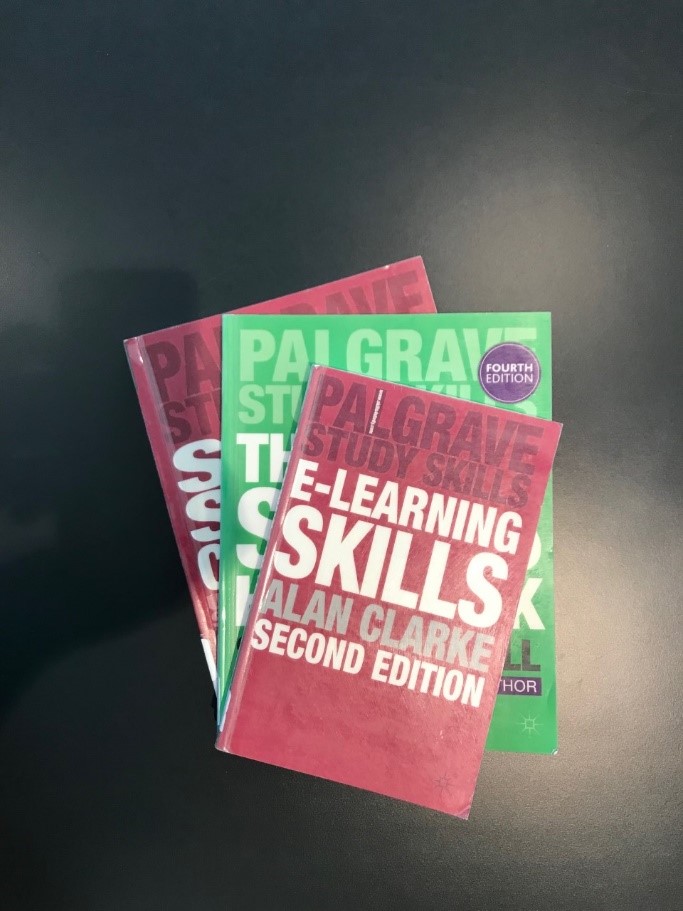
If you’re struggling with finding academic help resources within Catalyst, then look no further. Here, I’ve compiled a list of Palgrave Macmillan Study Skills handbooks that will enhance your study skills.
The handbooks can be found on the 2nd floor of Catalyst, usually in the 370s. Here are just some of the titles on offer:
- The Study Skills Handbook (371.30281/COT)
- Teaching Study Skills and Supporting Learning (378.170281/COT)
- Presentation Skills for Students (808.51/VAN)
- E-learning Skills (371.334/CLA)
- Study Skills Connected: Using Technology to Support your Study(371.30281/COT)

Not only does Catalyst have these useful books available, you can also book onto any of the Learning Services workshops or one-to-ones. There are multiple workshops available, including Academic Writing, Paraphrasing, Presentations and Lit Reviews. You can book onto any of these workshops here. There are much more resources for study skills available in Catalyst, why not use the library catalogue to check some of these out?
Written by: DYLAN BOOTH
3rd Year Creative Writing Student
Student Advisor for Library & Learning Services