

-
Blackboard September 6th 2024 Updates
The September updates to Blackboard will introduce several significant improvements that will benefit academics, students, and course administrators. These updates focus on enhancing instructional design, improving the course content page, and supporting learner progression.
(more…)
-
Flexible Grading for Blackboard Tests
The Flexible Grading view has now been added to Blackboard.
Essentially Flexible Grading means you have the option to mark tests by student or by question. For example if you want to mark everyone’s answers to question one before moving on to question two, the workflow is now quick and simple.
Flexible Grading makes small changes to the marking view for Tests and Assignments, but does not affect Turnitin. Blackboard’s short introductory video shows how the new Flexible Grading view will look.
The update includes other features that could improve your workflow, such as the ‘Marking Status’ drop down option that allows you to just see the student submissions and questions that need marking.

See the Blackboard ‘Grade Tests With Flexible Grading‘ page for more detailed information.

By Peter Beaumont, Learning Technology Development Officer
-
New for Blackboard – Documents Content Designer & File Converter
Blackboard have just released one of the most impactful enhancements in course design with Document pages.
Document pages are a great way to create and present a variety of visual elements. The good news is that they are now even easier to create, and the new content designer gives you more options on how to lay out your content.
With the new content editor, you can now place content side by side without the need to insert a table first, simply drag and drop content or use the menu commands.
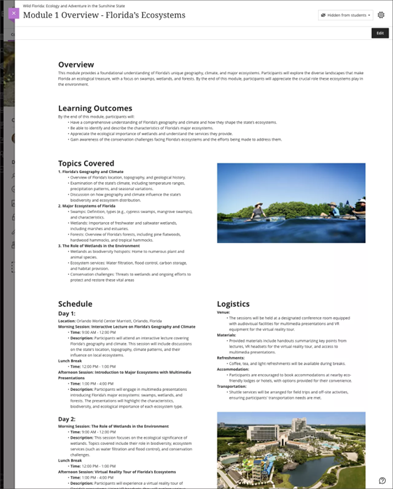
Image 1. Enhanced Document with diverse content laid out in rows and columns When you create a new document page you will now be presented with a menu like the one below.
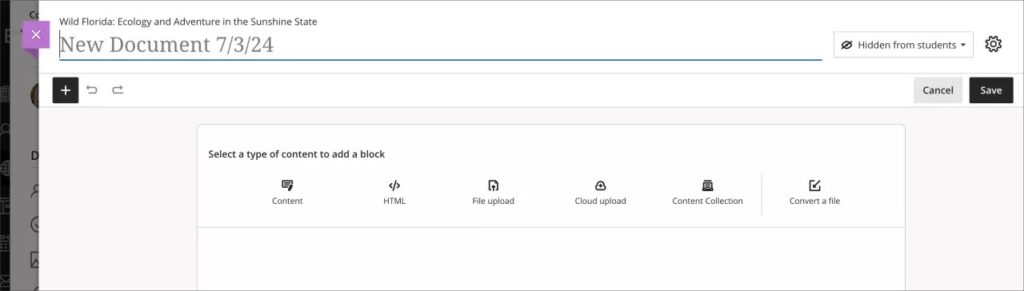
Image 2. Empty Document with block options It is advisable to chunk your content into separate blocks in order to take advantage of the new layout features.
Existing document pages will remain as they are but once you click edit you will be able to utilise the features.
Demo of Document page Content Editor Convert a File
With the addition of the new file converter option, you can upload any Word/PowerPoint or PDF directly to the page and it will bring in text and images. It will even bring in Alt text if they have been included in your original document.
Simply select ‘Convert a File’ from inside of the document page, find the file you want to convert and select open. It may take a couple of minutes to convert the document
Demo of Converting a File within a Document Page

