-
Supporting your students using Reading Lists Online
Edge Hill academic staff have been using Reading Lists Online since November 2017 to create up-to-date dynamic resource lists for their students.
As Reading Lists Online is a web-based tool, lists can be updated and published to your students immediately; there is no longer any need to wait for your lists to be updated. You can direct your students to any type of material, including webpages, Lynda.com tutorials and Box of Broadcasts playlists, as well as traditional books and journal articles.
You can use Reading Lists Online to instruct Learning Services of the new titles you want to purchase for the library collection.
Watch the video below to hear what a member of staff from Sport & Physical Activity has to say about using Reading Lists Online.
You can find additional information on Reading Lists Online on the Learning Services Wiki or please contact your Academic Engagement Specialist.
-
Hosting all around – 360° video content.
360° content is increasing in popularity.
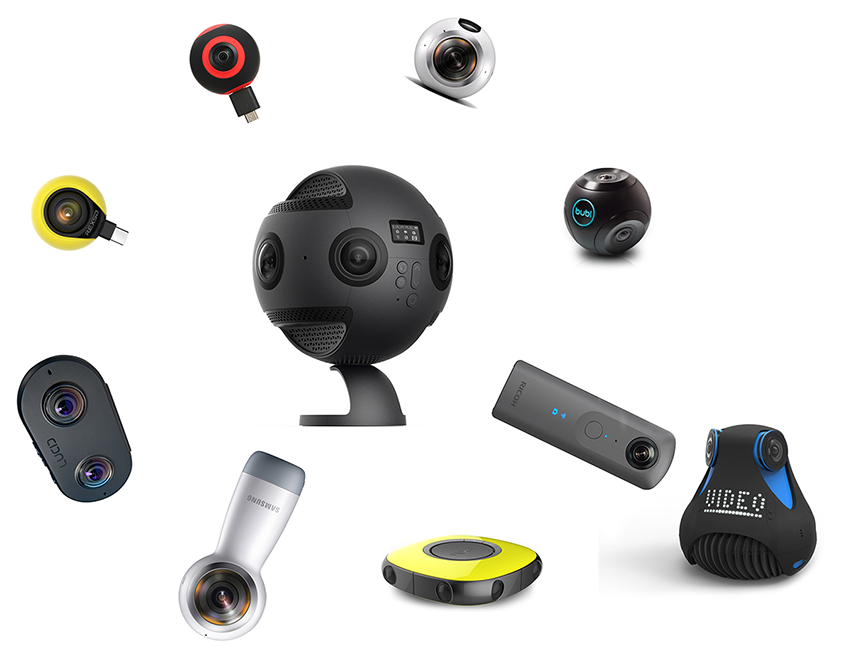
 The production of 360 degree content couldn’t be easier; most of us have access to devices capable of capturing images that software or apps can stitch together to give an immersive viewing experience.
Lecturers across the university continue to explore this technology, generating good quality content for students to access through their devices whilst studying a module.
However, our own Media Production Team have invested
 in the latest Insta360 Pro 360º professional camera, which they explain, presents a whole range of new possibilities when filming around campus. To learn more about the Media Production Team and the Insta360, visit the Learning Services wiki pages.
Examples of use: Areas across campus where 360° video is being used and generating interest:
- Faculty of Health and Social Care – Paramedics and the 360° Experience. An ambitious project which aims to expose students to a variety of environments, giving them a sense of being present at a scene without actually being there in person (virtual practitioner). Barry Mathews (Lecturer in Paramedic Practice and Pre-hospital Care) is exploring the potential of 360° images to simulate hazardous and clinical settings. Students will practice their observational skills and identify individual hazards and use this to influence their dynamic operational risk assessment.
- Whilst on field trips with her students, Susan Jones (Lecturer – Geographical Information Systems) produced a series of 360° photographs of locations visited along the Northwest Coastline of scientific interest. For Sue, who is keen to start using immersive content on her modules, this was an exciting time to (metaphorically speaking), tentatively dip a toe into the immersive water. Initial thoughts suggest there is value in producing content that students can use for revision, that gives them the means to study and explore areas of interest and identify points of reference.
- The University Library, as part of its introduction to staff and students, has produced a 360° tour. People can take a virtual look around the different spaces and facilities before actually visiting in person. Interactive hot-spots provide information whilst red target-like buttons make it possible to move from room to room and between floors.
Other uses of 360 content:
- Capital Projects site walk-through (CATALYST). Experience Edge Hill University’s newest £26m building, go on a tour with others and see how the building looks during its construction.
- Aintree Library IT Suite and Issue Desk 360° Images. Never visited Edge Hill University’s Aintree Library? These photosphere images give you an all-round view of the IT Suite, Issue Desk, study space and shelf stock.
Plans for future use:
- Paul Ward’s (Head of English and History) interest in 360 content, to make resources that are fun and interactive. It also enables the department to address all the disciplines; so for example, a virtual fieldtrip using 360 would allow historians to look at developments across time, linguists to look at language use in different contexts, creative writers to visit new settings for fiction, and literary critics to explore literary connections or literary settings. Paul goes on to say, “It also shows students how digital technologies that they are familiar with are learning and research tools”.
Options for hosting your 360° video content.
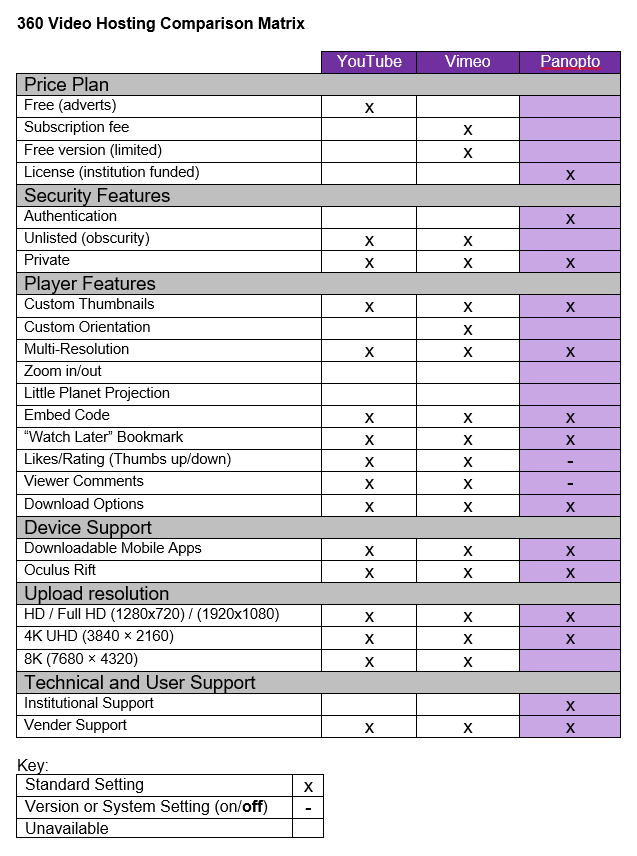
There are many hosting options around, the trouble is most offer hosting at a price, via a subscription, or they have free versions that are limited in features or for a limited time.
Here, we look at three of the most popular services used by staff at Edge Hill University.
About each platform
Online option: YouTube

A free video sharing/social website where anyone with an account can view, upload and share content.
If you need your content to be shared worldwide, YouTube is the second largest search engine. However, if you wish to target your audience, for instance within a module, by hosting your videos on YouTube, you are sending your audience to a third party site. This means that YouTube videos will be more visible within Google, compared to the videos embedded on your modules.
Unwanted content, clutter can be distracting for some, particularly those with a Specific Learning Difficulty (SpLD). YouTube’s auto play function means students may view unrelated content based on their own search criteria and pattern.
Online option: Vimeo

Aimed at giving filmmakers a platform to present and promote their work.
Unlike YouTube, Vimeo doesn’t rely on funding from ads, preferring to offer a service which has less clutter, charging a membership fee for 500MB of space per month. Unless you opt for Pro membership, Vimeo’s video player incorporates its logo alongside your content.
Institution option: Panopto
 Institutional platform to manage, live stream, record, and share videos across an organisation and/or a specific module in Learning Edge.
A secure platform for educational content, you manage access and take control of what your audience can see, no adverts, or suggested videos and no more clutter. Unlimited space, full feature and no additional cost implications.
The University offers dedicated support and staff training. Guides and FAQs provide just-in-time resources at the point of need. Students can benefit from using assistive tools, with Panopto’s playback viewer, such as:
- A graphical and textual index of PowerPoint slides.
- The ability to slow down or speed up the recording.
- The ability to make time-stamped typed notes and bookmarks.
- A search tool that indexes on-screen text as well as spoken audio.
For a comparative view of the three services covered in this post, click the image below:
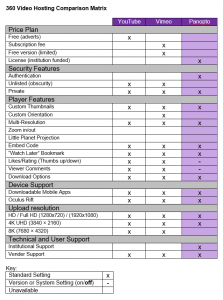
Alternatively, download a PDF version: 360° Video Platform Comparison Matrix.
If you are interested in finding out more about creating your own 360° content and hosting options, contact Learning Technology Development Team via ext.7754, [email protected] or Ask LTD knowledge base.

Martin Baxter
Learning Technology Development Officer
-
Moving forward with Reading Lists Online
Reading Lists Online provides you with the autonomy to drive selection and purchasing of the resources you want for your library collection.
Since November 2017, the Academic Engagement team have run small group training sessions, which have led to many Academic staff instantly creating, publishing and personalising lists to suit their module structure and enhance teaching and learning.
As this is a web-based tool many Academics have not just been adding e-books and full-text journals etc. but also links to online training resources such as Lynda.com.
Engaging with Reading Lists Online not only provides advantages for yourselves but your students will benefit from your lead by having:
- Up-to-date module reading
- Library stock available in time for learning
- Integration into Blackboard
- Click-through to digitised chapters and articles
- Guidance notes
- Personal reading record
- Enhanced study experience
Watch the video below to hear what a member of staff from Performing Arts has to say about using Reading Lists Online:
You can find additional information on Reading Lists Online, including how to get started on our Learning Services Wiki or please contact your Academic Engagement Specialist.