

-
Has Video Thrilled the Students so Far?
How video has been used to enhance engagement and the student learning experience on a blended learning programme
The Mathematics Specialist Teacher (MaST) Programme is a blended course for serving primary maths teachers aimed at improving subject knowledge, pedagogy and collaborating with colleagues in school. It includes Conference Days with nationally recognised speakers, Local Meetings led by maths consultants and online learning materials, all of which are linked via the VLE. As online materials can too often be very dry, we have included a variety of approaches to provide students with a positive experience, including the use of videos in various contexts.
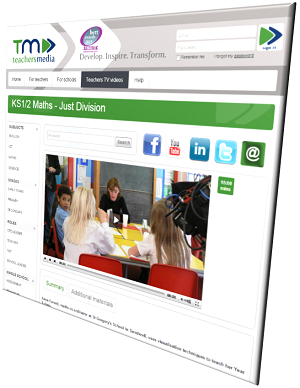
Within the learning materials, links to video clips on sites like YouTube help exemplify both the theoretical and practical ideas the students cover. For example, how to use practical resources and visualisation techniques to support the understanding of difficult concepts such as “3 divided by a half” (The answer is NOT 1 ½ … Click to ‘Watch and Learn’!).
Via discussion boards, students are also encouraged to share links to useful videos. They are using these resources within their practice on a daily basis, so it seems natural to get them to share examples of good practice. For example, this idea of a ‘Fraction museum’ was posted by a student – here’s the link to the YouTube video: Fraction Lesson: teach your class fractions with Math Man.
One of the key requests in the recent Edge Hill survey into Students’ ideal VLEs was for the opportunity to be able to watch the lecture again later. Throughout the programme, we ask for permission to film our keynote speakers, and now have many of their sessions available within Blackboard. This means not only can students revisit lectures at a later time, students who were unable to attend or missed a speaker who delivered at an alternative geographical location, can still have access (although we do stress that this is not quite the same as attending in person…!) The agreement with the speakers though, is that these are only available to the students registered on the programme.
As well as using video to enhance the experiences of current students, the MaST Team, in association with the Media Team, has produced a Recruitment / Marketing Video. This link is now being sent out to prospective students and is included on our own website as well as via other channels like the National Centre for Excellence in the Teaching of Mathematics (NCETM).
We are always looking for ways to improve the student experience, and as a result of some of the feedback we received from students, following our submission for the Blackboard Exemplary Course Programme* award (ECP) and having seen other courses that we reviewed with the LTD team, we are now looking to include short video clips of various members of the team (Academic, admin, ATs etc.) in a ‘Welcome’ area so that students can immediately put faces to names, thus giving the course a more ‘personal’ or ‘human’ face in what some students may see, at first, as a rather intimidating online environment.

Steve Sherer
Senior Lecturer
Mathematics Specialist Teacher ProgrammeFor further help, support and advice on how you can use video, YouTube and similar services with the Learning Edge Suite contact your Learning Technologist (see the Faculty Contacts on this page) or email the LTD Team on [email protected] or call x7754.
*Note that Blackboard’s ECP programme starts next Monday (22nd July) – it’s a “… free online course over a 4 week series of virtual meetings via Blackboard Collaborate (web conferencing platform). Using their ECP rubric the sessions are delivered by Blackboard ECP directors and previous winners who will expand upon each element of the rubric”. Click on the text above to see Mark Wilcock’s post about the programme – or contact him directly: [email protected] (x7069).
-
Beyond the Baseline: How soon is now?

Over the past few weeks I’ve shared our Blackboard Exemplary Course Program (ECP) experience with you all, both internally and externally. I hope I’ve inspired many of you to start thinking about how you can build an exemplary course within Learning Edge (Blackboard Learn 9.1) and what it can do for your students.
The goal of submitting and winning an ECP in 2014 for Edge Hill University would not only be a massive ‘pat on the back’ for the institution but to also showcase your hard work and excellent use of e-learning. In the long term, I would imagine that tutors will over time naturally adopt the ECP rubric into their practice from the beginning to encourage evaluation and to lead into a cycle of innovations and improvements that will continuously enhance the student experience through Learning Edge.
So with this in mind, let me introduce you to the ‘Exemplary Course Cohort’ sessions. Starting this month (22nd July) Blackboard will be hosting and delivering this free online course over a 4 week series of virtual meetings via Blackboard Collaborate (web conferencing platform). Using their ECP rubric the sessions are delivered by Blackboard ECP directors and previous winners who will expand upon each element of the rubric;
- Course Design
- Interaction and Collaboration
- Assessment
- Learner Support
Each session will provide you with some fantastic theoretical concepts and will also ensure you are getting the best out of the available tools to help recognise, organise and build your module areas against the ECP standards. Best of all, this course is totally free and starts on Monday 22nd July and finishes on 12th August 2013. Each of the 4 live sessions will run on every Monday @ 2pm (GMT) for approximately 1 hour.
You can register for the course today by clicking on the following link:
http://learn.blackboard.com/ecpcohort
This a great opportunity for you all to increase your e-learning knowledge and to enhance the student experience, which will greatly improve their opportunities for success. Who knows, you could even be submitting your course in 2014 for an ECP award?
Feel free to get in touch with me at [email protected] if you have any questions or would simply like to know more.

Mark Wilcock
Learning Technology Development Officer
-
Using Blackboard for collaborative writing
By Rob Spence, Associate Head of Department – English & History
 In the Humanities, the written word is still the key method by which assessments are made, so it is crucial that students are adept at all aspects of writing. One issue with the emphasis on written assignments, however, is that they tend to be “high-stakes” activities: get one assignment badly wrong, and it might mean you fail a module. Moreover, traditional lecture and seminar activities are usually confined to the kind of writing that you don’t show to anyone else – notes of one kind or another. So students on Humanities degree programmes seldom have the chance to practise this most crucial aspect of their work. What’s more, in the age of employability, it is arguable that the kind of writing students do in this area is quite narrowly defined – academic essays for a single reader, whose assessment, moderation notwithstanding, is final.
With these considerations in mind, I wanted to use Blackboard to enable students to approach their studies in a different way, one that would give them some experience of working collaboratively too, in more of a “real-world” way than the solitary experience of working on an assignment. The method was to set up groups who tackled aspects of our module topics through Blackboard’s built-in wiki tool. Each group was assigned a discrete area of enquiry, and the brief was to produce entries under agreed headings that would be of use to everyone on the module. In this particular module, which is about contemporary fiction in English from South and East Asia, in particular Malaysia, India and Sri Lanka, it was important that students knew something about the cultural, historical and political contexts out of which the texts they were studying had emerged. Each group was assigned a country, and asked to produce a resource that would be useful to their peers when we came to look at the set texts from that country. We had no hierarchy in mind, though it quickly became apparent that some students would emerge as editors and others as contributors. Inevitably, since the activity was unassessed, some students opted for minimal involvement.
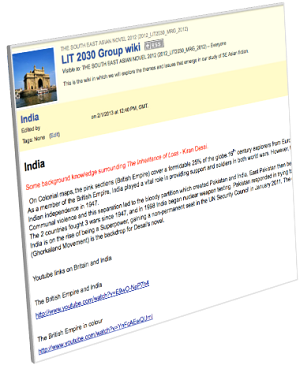 The task was approached seriously by the majority, and the resources were genuinely useful. They were briefed to use only verifiable, authoritative sources (no Wikipedia!) and to produce original work from the materials they found. They had to consider the purpose and format of their work, and its audience. They also needed to work as a team, and to react to each others’ contributions before agreeing a final version. Anecdotal feedback suggests that those who engaged fully found it very useful both in extending their knowledge and also developing their writing skills.
The wiki tool in Blackboard is easy to use, and enables students to produce professional looking content with the minimum of fuss. In this case, students were driven to think more broadly and independently about the topics, and this was reflected in some very pleasing and original assignments at the end of the module.
Rob Spence
Associate Head of Department – English & History
Faculty of Arts and Science
[email protected]For further help, support and advice on how you can use wikis, web 2.0 tools and other features of the Learning Edge Suite contact your Learning Technologist (see the Faculty Contacts on this page) or email the LTD Team on [email protected] or x7754.
David Callaghan, 26th June 2013

